

Platform features
80+ features designed for Bangladeshi businesses — AI content, dual-mode accounting, Steadfast courier, and bKash payments.
80+
features included
20+
financial reports
2
languages (EN & BN)
5 min
average setup time
Storefront
A complete store your customers will love
Fast catalogue, bilingual storefront, hero banners, dynamic variants, and checkout without an account — the store Bangladesh shoppers already expect.
Browse
Product catalogue with search & filters
Category navigation, live search, and filters — with hero banners cycling promotions and flash-sale alerts across the store.
- Hero banner carousel for promotions
- Category filters & live product search
- Flash sale alerts with countdown
- SEO-ready product & category pages
- Language toggle on every page
The product
Detail pages & dynamic variants
Image galleries, rich text in English and Bangla, and unlimited variants — size, colour, material — each with its own stock.
- Multi-photo product gallery
- Unlimited variants with stock tracking
- Rich descriptions in both languages
- Sale price with original strikethrough
- Wishlist without creating an account
Buy & track
Guest checkout & phone tracking
No password wall. Customers order with name, phone, and address — then track with just their number.
- One-page checkout — name, phone, address
- Track orders with phone number only
- Automatic order numbers
- Live status on the tracking page
- Guest orders auto-link if they register later
Mobile experience
Built for every screen, especially mobile
Bangladesh shops on mobile. The storefront has an app-style bottom dock, and the admin is fully usable from a phone — no laptop needed.
Bottom dock
Mobile bottom dock navigation
On small screens the storefront switches to a native-app dock — Home, Search, Sale, Track, and Cart stay one thumb away.
- Sticky bottom nav on every storefront page
- Live cart badge with item count
- Touch-friendly tap targets
- Smooth page transitions on mobile
- PWA-ready layout
Admin on phone
Fully responsive admin on mobile
Orders, products, payments, and courier push — all usable on a phone screen. Verify bKash, update status, and run the shop from your pocket.
- Orders, products & customers on any screen
- One-tap bKash verification
- Dashboard stats at a glance
- Floating dock for Dashboard, Products, Orders, Settings
- Steadfast courier push from your phone
Admin dashboard
Manage everything from one place
Products, orders, customers, analytics, and fraud checks — the same admin merchants use every day, with guided tours on first visit.
Overview
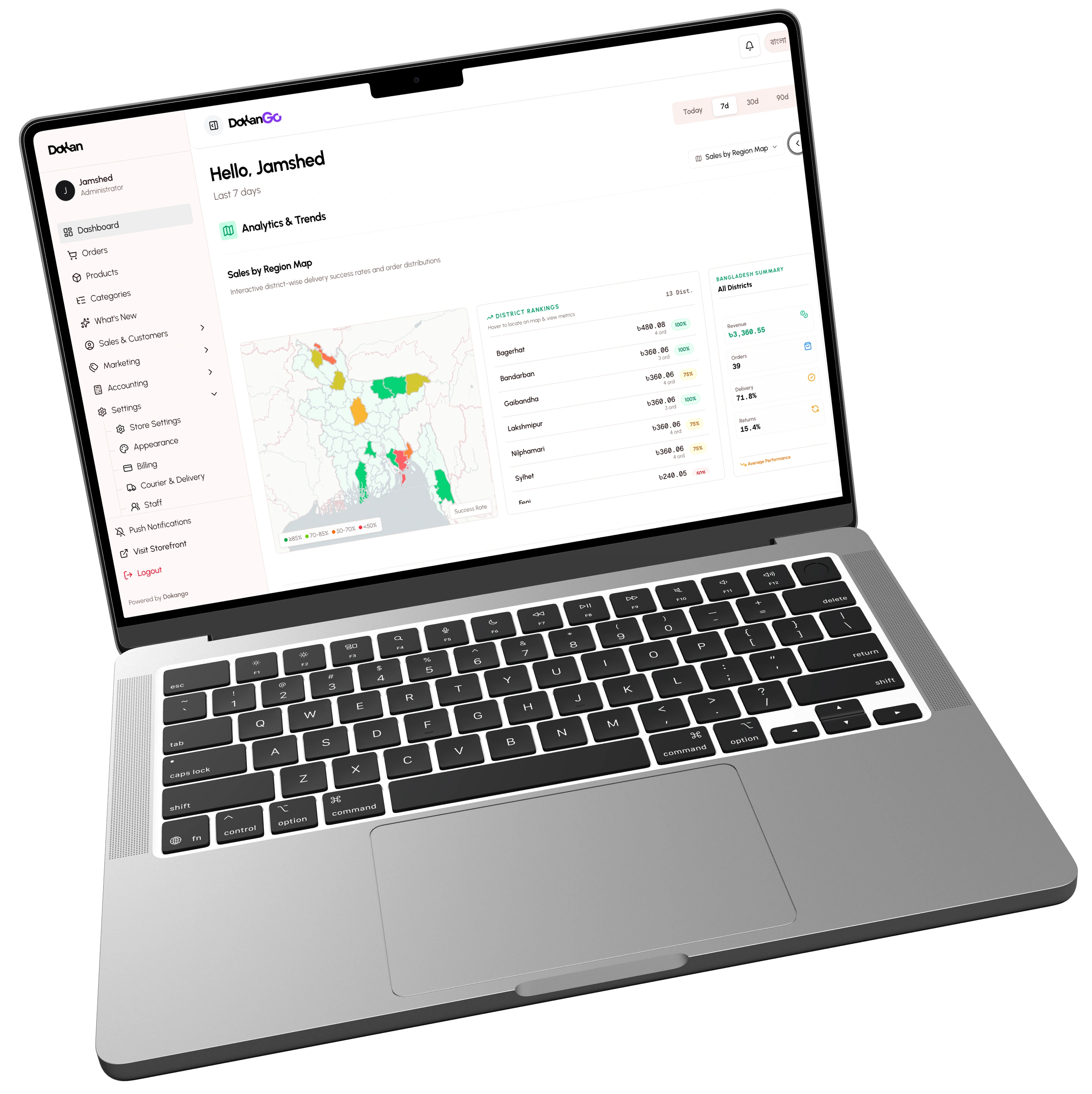
Dashboard overview & analytics
Revenue, orders, and customers at a glance — with weekly charts, pending alerts, and recent orders so you know what needs attention first.
- Revenue, orders & customer KPIs
- Weekly sales chart carousel
- Pending & unpaid shortcuts
- Recent orders with status pills
- Date range: today through 90 days
Orders
Order processing & status management
Move orders through a clear pipeline — Pending to Delivered — with filters, unpaid shortcuts, and bulk-friendly status updates.
- Six-stage order pipeline
- Status & payment filter chips
- One-tap payment verification
- Tracking code & courier push
- Customer and internal notes
Customers
Customer log & history
Guests and registered buyers in one place — phone, address, spend, and order history without juggling spreadsheets.
- Full order history per customer
- Guest + registered together
- Phone & address on file
- Total spend per customer
- Guest orders auto-link on register
Fraud check
Fraud order detection
Before you ship, check delivery history on the phone number — cancel rates and past parcels surface as risk so you call first, not after.
- Steadfast delivery history check
- Trusted vs risky scoring
- Same-phone cancel rate alerts
- Total / delivered / cancelled stats
- Call before you ship high-risk orders
Payments & checkout
Payments the way Bangladesh pays
No gateway fees or middlemen. Customers pay to your bKash, Nagad, or Rocket number — cash on delivery included — and you verify in one tap.
Methods
bKash, Nagad, Rocket & cash on delivery
Accept the wallets your customers already use. Configure numbers in Settings, turn COD on, and keep every taka in your own account.
- Pay to your own wallet number
- Cash on delivery with optional fee
- Method shown on every order
- Zero gateway transaction fees
- Guest checkout toggle in Settings



Verify
Manual verification — no middlemen
Customers submit a TrxID or screenshot. You review Payment Info on the order, then Mark as Paid — money never leaves your wallet.
- TrxID or screenshot from the customer
- Payment Info on every unpaid order
- One-tap Mark as Paid
- WhatsApp the customer if needed
- Full history on the order timeline
Checkout
One-page guest checkout
Name, phone, address — done. Pick a wallet, send money, paste the TrxID, apply a promo, and place the order without creating an account.
- Name, phone, and address only
- Promo codes with live discount
- Order summary with product images
- TrxID + optional payment screenshot
- Immediate confirmation after place
Marketing & sales
Drive urgency, boost sales
Flash sales, promo codes, bento banners, and Meta CAPI — built into admin so you never bolt on another marketing tool.
Flash sales
Flash sales with live countdown
Set a price window per product. Countdown timers and orange badges create urgency across the storefront — then auto-end when time is up.
- Sale price + time window per product
- Hero countdown with hours / minutes / seconds
- Flash badges on product cards
- Site-wide alert marquee while live
- Auto-ends when the timer hits zero
Promo codes
Promo codes — fixed & percentage
Create SAVE20 or flat ৳ discounts with expiry dates and max uses. Customers apply them at checkout and see the discount before they confirm.
- Percentage or flat ৳ discount types
- Optional max discount cap
- Expiry dates and use limits
- Live discount before place order
- Logged against every order
Bento
Bento banner engine
Build mosaic banner grids with presets — Hero Left, Masonry, Grid 2×2 — and assign links per cell. No HTML coding required.
- Preset mosaic layouts
- Custom row and column spans
- Per-cell product or category links
- Drag to reorder live banners
- Responsive on mobile automatically
Meta ads
Facebook Pixel & Meta CAPI
Paste your Pixel ID and Conversion API token in Settings. Purchase events fire server-side when orders are placed and payments verified — better ad targeting without another plugin.
- Browser Pixel + server-side CAPI
- Configured in Store Settings
- Inline setup guide with steps
- Fires on place order & verify
- Built for Meta ads accuracy
Accounting & finance
Calculate true profitability effortlessly
COGS, courier fees, district margins, and what-if scenarios — built into admin so you know what actually makes money.
Modes
Basic vs advanced modes
Start with plain-language Money In and Product Profit — or switch to Net Revenue and Gross Profit when you are ready for double-entry terms. Same books either way.
- Basic income / expense language
- Advanced double-entry terminology
- Same data — labels only change
- Switch anytime in Settings
Profitability
Product profitability & stock forecast
See TRUE net profit after COGS, courier, and packaging — plus stock days left so you reorder before you stock out or keep sinking money into a money pit.
- Variant-level COGS tracking
- Auto courier & packaging fees
- TRUE net profit per product
- Reorder Now / Low Stock alerts
Map
Geographic profitability map
District colors show delivery success. Spot high-return regions and stop subsidising shipping where margins collapse.
- Revenue & profit by district
- Delivery success choropleth
- High-return region callouts
- Smarter regional marketing & COD fees
Simulator
What-if simulator
Slide price or ad spend and project TRUE profit before you commit budget — including break-even floors and discontinue recommendations.
- Price, ad spend & discontinue tabs
- Dynamic TRUE profit impact
- Break-even floors in view
- Data-based budget decisions
Trust & support
Build confidence with reviews & QA
Verified reviews, public product Q&A, and a returns pipeline that recovers inventory — so shoppers trust you and you stay in control.
Reviews & FAQ
Verified reviews & product FAQ
Shoppers see star distribution, verified purchase badges, and public Q&A on every product page — while spam is filtered before it hits the storefront.
- Fingerprint-backed review submissions
- 5-star distribution on the PDP
- Public product Q&A with Ask CTA
- Verified Purchase badges
Returns
Returns & resolutions pipeline
Failed deliveries, COD refusals, and partial returns in one queue — with fraud warnings, cost breakdowns, and Complete / Reship actions.
- Failed-delivery & COD refusal workflow
- Inventory recovery tracking
- Fraud warnings before reship
- Manual reshipments from the case
Engineered with AI
Work faster with AI smarts
Generate bilingual product copy from a name and a few hints — then turn review noise into clear compliments, complaints, and FAQ ideas.
Generate
1-click content generation
Type a product name, add optional hints like “100% cotton” or “Eid collection”, and generate English and Bangla descriptions plus specs in one click.
- Descriptions from a basic name + hints
- Specs auto-filled alongside copy
- Consistent on-brand tone
- Bilingual EN and Bangla output
Analyse
Intelligent review & FAQ analyser
Summarise dozens of reviews into top compliments and complaints, then surface FAQ suggestions you can publish — in English or Bangla.
- Pros / cons from real reviews
- Top compliments and complaints
- FAQ suggestions from themes
- Faster product decisions
Bilingual support
Full English and Bangla — one click away
One click switches the storefront and admin. Products carry separate English and Bangla names and descriptions — same URL either way.
Language toggle
One-click language toggle
EN ↔ বাংলা everywhere — storefront chrome, product titles, cart buttons, and admin labels. Tap the pill and the whole experience flips.
- EN ↔ বাংলা on every page
- Storefront fully translated
- Admin UI follows the same toggle
- Status labels in both languages
- Customer emails respect preference
ভাষা: বাংলা — এক ক্লিকে ইংরেজি
স্টোর + অ্যাডমিন
পুরুষ
কটন পাঞ্জাবি
৳1,850
কার্টে যোগপুরুষ
লিনেন শার্ট
৳1,100
কার্টে যোগনারী
কুর্তি সেট
৳1,450
কার্টে যোগঅ্যাক্সেসরিজ
লেদার ওয়ালেট
৳650
কার্টে যোগবাংলা
কটন পাঞ্জাবি
নরম সুতির কাপড় · ঈদ কালেকশন
English
Cotton Panjabi
Soft cotton fabric · Eid collection
Product content
Bilingual product content
Separate English and Bangla fields for names, rich descriptions, and categories. Search hits both; the product URL stays language-agnostic.
- Separate EN + BN name fields
- Rich text editors in both languages
- Category names in EN and BN
- Search across both inputs
- Language-agnostic product URLs
Shipping & logistics
Courier integration built for Bangladesh
Connect Steadfast, Pathao, RedX, or CarryBee — push eligible orders in one tap, and let customers track by phone through Pending → Delivered.
Couriers
Multi-courier integration
Connect Steadfast, Pathao, RedX, and CarryBee in Settings. Pick a provider per order, push in one tap, and the consignment ID plus tracking code land on the order.
- Steadfast, Pathao, RedX & CarryBee
- API credentials per provider
- Choose courier when you push
- Consignment ID on the order
- Tracking code shared with customer



Track
Phone-based order tracking
Customers look up orders with their phone number — see every order, status chips, and courier tracking codes from whichever provider you used.
- Track with phone number only
- Multi-order results in one view
- Status chips per order
- Courier code when available
- Works for guest & registered
Pipeline
Order status pipeline
Pending through Delivered on every order — with timestamped logs, courier sync, bulk updates, and cancelled reasons when things go wrong.
- Pending → Confirmed → Shipped → Delivered
- Cancelled with reason logged
- Timestamped status history
- Customer sees live status
- Bulk status updates
Customisation & branding
Your store, your brand — set up in 5 minutes
Pick Default, Modern, or Titanium in Appearance, open the Design builder to tune colour, type, and shape against a live preview, finish the setup wizard, and learn the admin with guided tours.
Appearance
Appearance — themes & brand colour
Choose Default, Modern, or Titanium from Appearance settings. Preview or activate a theme, set your brand colour, then open the designer when you are ready to go deeper.
- Default, Modern & Titanium themes
- One-click Preview and Activate
- 13+ brand colour palettes
- Design entry card → Open the designer
- Theme & Sections under Appearance
Theme builder
Theme builder — Design your storefront
Full-screen Design: arrange sections on the left, live preview in the centre, Content / Style / Theme inspector on the right. Colour, Type, and Shape tabs edit the whole shop — Publish when it looks right.
- Sections rail with drag & add
- Desktop · Laptop · Tablet · Mobile preview
- Content · Style · Theme inspector
- Colour / Type / Shape theme tabs
- Light & dark mode editing · Publish
Setup wizard
5-minute guided setup wizard
Identity, payments, theme, delivery zones, then launch — reopen anytime from Settings. Theme choice and brand colour sit right in the wizard flow.
- Step 1: name, logo & contact
- Step 2: payment numbers
- Step 3: choose theme + brand colour
- Step 4: delivery zones
- Step 5: preview & go live
Tours
Guided tours for every feature
Tooltip tours on Appearance, Orders, Products, and Settings — plain-language highlights so merchants never hunt for a help article.
- Tooltip tours on major screens
- Theme & Design tour included
- Orders / Products / Customers / Settings
- Restart from Help anytime
- First-visit tips on key pages